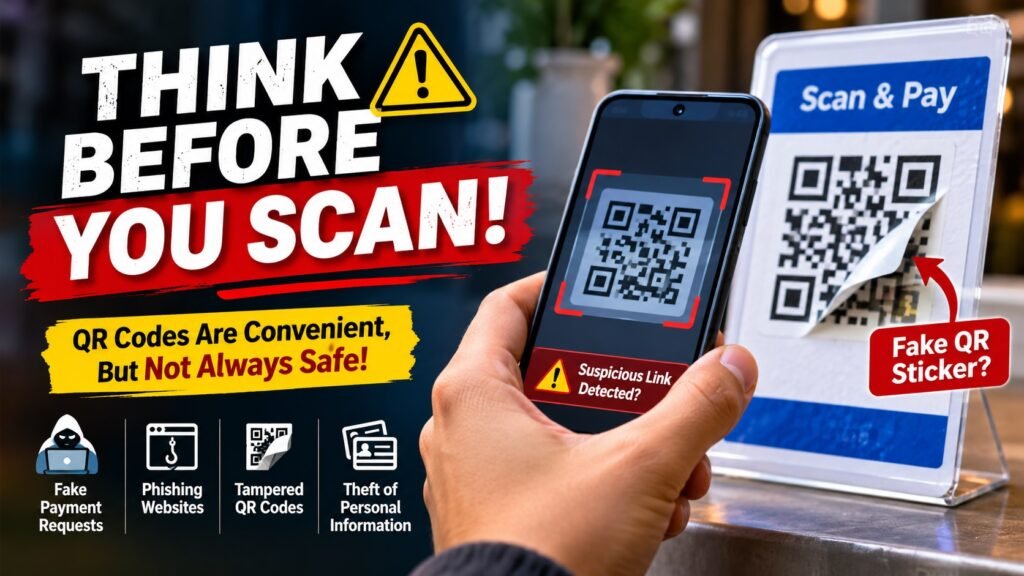
Read This Before You Scan Any QR Code: The Hidden Risks You Should Know
A QR code on a restaurant table, a parking meter, a delivery package or a payment counter may look harmless. But do you know where it will take you? Before scanning an unfamiliar QR code, understand how fake codes, phishing pages and payment tricks can put your personal information and money at risk.
A practical safety guide for UPI users, shoppers, travellers and small business customers in India.
Why You Should Think Twice Before Scanning a QR Code
QR codes make everyday activities easier. You can scan one to open a restaurant menu, visit a website, make a UPI payment, access an event ticket or view product information.
The problem is that a QR code is simply a way to encode information. It does not prove that the information is trustworthy. A criminal can create a QR code that redirects you to a fake website, a fraudulent payment page or a page designed to collect sensitive information.
This type of QR-based phishing is often called quishing — a combination of QR code and phishing. The goal is to make you trust the code and act without checking where it leads.
The US Federal Trade Commission has warned about scammers placing their own QR codes over legitimate ones, as well as sending unexpected QR codes through messages and emails. The FBI has also described cases involving tampered QR codes that redirect users to malicious websites.
5 QR Code Risks You Should Know About
1 Fake QR Code Stickers
Imagine visiting a parking area or a shop where a QR code is displayed for payment. Someone may have placed a different sticker over the original code. You think you are paying the legitimate business, but the replacement code may direct you somewhere else.
What to watch for: A sticker that looks pasted over another code, damaged signage, unusual printing or payment details that do not match the business.
2 Fake Websites That Look Genuine
A QR code may open a website that imitates a bank, delivery company, shopping platform or government service. The page may use familiar colours, logos and wording to appear authentic.
If you enter your password, card details, OTP or other sensitive information on a fake page, criminals may use that information to target your accounts.
What to watch for: Misspelled domain names, unfamiliar website addresses, unexpected login requests and pages demanding sensitive details without a clear reason.
3 The UPI “Receive Money” Trick
This is particularly important for people who use UPI in India.
A stranger may claim that they want to send you money, issue a refund or pay you for something you are selling. They may then send a QR code or payment request and ask you to scan it to receive the money.
Be careful: scanning a payment QR and approving the transaction with your UPI PIN can authorise money to be sent from your account. A UPI PIN is not required simply to receive money.
4 Unexpected QR Codes in Messages or Packages
You may receive a message claiming that a parcel could not be delivered, your bank account needs verification or a reward is waiting for you. The message may include a QR code and pressure you to act immediately.
Scammers use urgency to reduce the time you spend checking a request. An unexpected package with a QR code can also be suspicious, particularly when the sender is unknown.
What to watch for: Threatening messages, limited-time rewards, delivery problems you were not expecting and requests to verify personal information.
5 Suspicious Downloads and Permissions
Some malicious QR destinations may encourage you to download an unfamiliar application or grant unnecessary permissions. A QR code itself does not automatically mean your phone has been infected, but the website or download it leads to may create a security risk.
What to watch for: Requests to install an APK from an unknown website, disable security settings or grant access that an ordinary webpage should not need.
One UPI Mistake That Can Cost You Money
Many QR payment scams rely on confusion between sending money and receiving money.
Here is the simple difference:
| Situation | What normally happens | What you should do |
|---|---|---|
| You display your own UPI QR code | Another person scans it to pay you. | Check your UPI app or bank account for the actual credit. |
| You scan a shop’s payment QR code | Your UPI app displays payment details. | Verify the recipient and amount before authorising payment. |
| A stranger sends you a QR code to receive money | It may initiate a payment or open an untrusted destination. | Do not scan or approve it just to receive money. |
| You receive a UPI collect request | You are being asked to approve a payment request. | Verify the sender, purpose and amount. Reject anything unexpected. |
7 Things to Check Before Scanning Any QR Code
You do not need advanced technical knowledge to follow these precautions. A few seconds of checking can help you avoid many common QR-related traps.
- Check where the QR code came from. Was it displayed by a business you recognise, or sent unexpectedly by an unknown person?
- Inspect physical QR codes. Look for stickers placed over the original code, unusual damage or signs of tampering.
- Preview the destination. If your phone displays a website address, read it carefully before opening it.
- Check the domain name. Watch for misspellings, extra characters and domains that imitate familiar brands.
- Verify payment details. Before approving a UPI transaction, check the recipient name and amount shown in your payment app.
- Never share your PIN or OTP. Do not enter your UPI PIN on a website or disclose it to someone over a call or message.
- Avoid unknown downloads. Do not install apps or grant permissions simply because a QR-linked page tells you to do so.
What Should You Do If You Have Already Scanned a Suspicious QR Code?
First, do not panic. Scanning a QR code does not automatically mean money has been stolen or your phone has been compromised. What matters is what happened after the scan.
If you only scanned it
- Close the suspicious page.
- Do not enter passwords, OTPs, UPI PINs or card details.
- Do not download unfamiliar applications.
- If you entered account credentials, change them through the official app or website.
If you approved a UPI payment or lost money
- Contact your bank and payment app immediately through their official channels.
- Report the incident to India’s cybercrime helpline at 1930.
- Submit a complaint at cybercrime.gov.in.
- Keep transaction IDs, messages, screenshots and other evidence.
Reporting quickly may help authorities and your bank take timely action, but recovery of transferred funds is not guaranteed.
How Small Businesses Can Protect Customers From QR Code Scams
QR code safety is not only a customer’s responsibility. Shops, restaurants, service providers and online businesses should also take reasonable precautions when displaying QR codes.
- Display QR codes in places where unauthorised stickers or replacements are easy to notice.
- Check physical payment displays regularly.
- Use a clearly identified business payment account.
- Tell customers to verify the recipient name before making payment.
- Use official website addresses and avoid unnecessary redirects.
- Replace damaged or suspicious QR displays immediately.
- Never ask customers to share their UPI PIN or OTP with staff.
Businesses creating their own QR codes should also test the final printed code before distributing it. A QR creation tool can help generate a code for a website, menu or other destination, but generating a QR code does not automatically verify that its destination is safe. Always test the destination and keep it under your control.
If you need to create a QR code for a legitimate business purpose, you can explore the CreativeMevin QR Code Generator. Remember: creating a QR code and checking whether someone else’s QR code is safe are two different tasks.
Frequently Asked Questions
1. Can scanning a QR code steal money from my bank account?
Scanning alone does not automatically transfer money from your account. However, a QR code can lead to a fraudulent payment request or a fake website. If you approve a payment or enter sensitive information, you may expose yourself to financial fraud.
2. Is it safe to scan a QR code for UPI payment?
It can be safe when the code comes from a trusted merchant and you verify the recipient name and amount displayed in your UPI app before authorising the payment. Do not approve unexpected requests.
3. Do I need to enter my UPI PIN to receive money?
No. You do not need to enter your UPI PIN simply to receive money. Entering your PIN in a payment flow generally authorises a debit from your account, so check the transaction carefully.
4. Can a QR code contain a virus?
A QR code is a way to encode information; it is not itself a virus. However, it can direct you to a malicious website or an unsafe download. Do not install unfamiliar apps or grant unnecessary permissions from a QR-linked page.
5. What is quishing?
Quishing is QR-code-based phishing. Criminals use QR codes to direct people to fake websites or fraudulent destinations where they may be tricked into sharing personal, login or financial information.
6. What should I do if a QR code opens an unfamiliar website?
Do not enter any information or download anything. Close the page and verify the intended website using a trusted address or official app.
Final Thoughts: Convenience Should Never Replace Caution
QR codes are useful, quick and part of everyday digital life. You do not need to avoid every QR code. You simply need to understand that a code is not proof of trustworthiness.
Before scanning, check its source. Before opening a link, inspect the destination. Before making a payment, verify the recipient and amount. And never enter your UPI PIN just because someone promises to send you money.
Pause. Check. Then Scan.
A few seconds of caution can help protect your money, personal information and digital identity. Share this guide with family members and anyone who regularly uses UPI payments.
Official Sources and Further Reading
The safety recommendations in this article are based on public guidance from recognised financial and cybersecurity organisations. You can read their original information here:
- Reserve Bank of India – Beware of QR Code Fraud
- NPCI – Fraud Awareness
- NPCI – UPI Frequently Asked Questions
- US Federal Trade Commission – QR Code Scams
- FBI Internet Crime Complaint Center – QR Code Tampering Warning
- India – National Cyber Crime Reporting Portal
Disclaimer: This article is for general awareness and educational purposes. It is not a substitute for advice from your bank, payment service provider or law-enforcement authorities.